Language

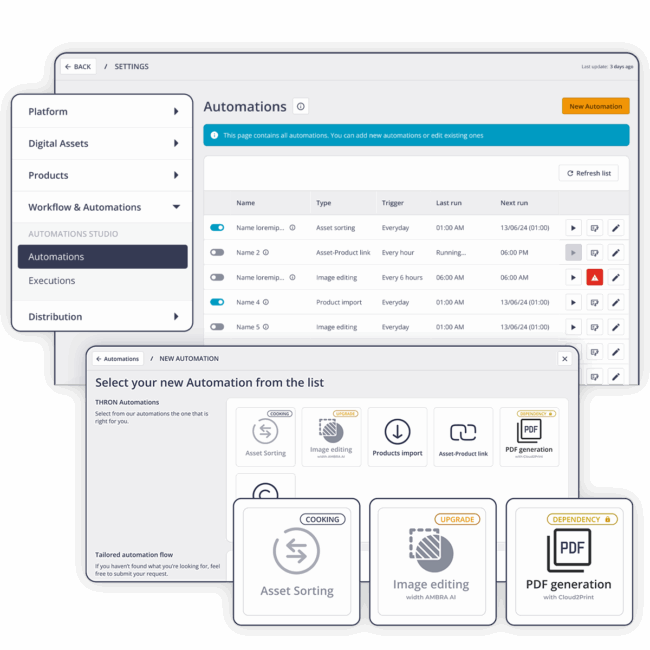
Each automation becomes a permanent part of THRON and runs automatically, at any volume, whenever needed.
Chosen by




















Browse the available automations and select the ones that cover your company’s recurring workflows.
Set rules, time-based or conditional triggers, sources and destinations. Without writing a single line of code.
The automation becomes a permanent part of the platform. No one ever has to think about it again.
Each automation works on its own, for you.
Mix and match them however you like, activate them when you need them, and let them evolve over time.
Produce text and content at scale, with no manual effort.

Generate branded catalogs, product sheets, and brochures as PDFs directly from product attributes.
Always up-to-date materials, zero outdated versions.

Removes backgrounds and enhances lighting and shadows across all selected assets, automatically.
Publication-ready images with no external tools.

Generates product descriptions from attributes or images, respecting defined keywords.
Consistent product pages across your entire catalog.

Generates translations of product descriptions, populating localized attributes.
Expand into new markets without impacting workload.
Put every digital asset and product data point exactly where it belongs, automatically.

Semantically analyzes every asset at upload, eliminating manual tagging.
Content enters the platform complete and searchable.

Links assets to the relevant product sheet attributes via naming convention.
Digital assets landed directly in the right product sheets.

Automatically reorders visuals to create optimal narrative sequences for each channel and context.
A compelling visual experience for the end customer.

Calculates, populates, and completes attributes through configurable cause-and-effect rules.
A catalog that’s always current, consistent, and reliable.
Enriches assets by extracting information from the naming convention or folder structure.
Metadata filled in with no manual entry.
Bring your entire content library into the platform without manual uploads, and govern it according to defined rules.

Imports data from external sources such as FTP, FTPS and SFTP systems, keeping the catalog always in sync.
No risk of stale or misaligned data.

Schedule recurring bulk imports, enrich metadata, and organize assets into folders.
Large volumes of content ready to use right away.

Schedule time-based or conditional events that trigger moves, publications, and expirations.
The right content in the right place at the right time.

Assign expiration dates to assets: on the set date, they will be unpublished from all channels.
Brand protected from misuse. Zero legal risk.

If you have a development team, you can build custom automations following THRON’s guidelines for the major programming languages.
Otherwise, we can design it for you. Describe the task and submit your request: our Customer Service team will respond by the next business day.
— New collection catalog
The photographer’s images land in THRON: they get enriched, linked to product sheets, translated, described, generate the branded PDF, and are pushed out to eCommerce, partners, and digital signage. Without anyone lifting a finger.
BEFORE: 3 weeks
WITH THRON: 4 hours
— Expansion into a new market
When you enter a new market: AI Translation localizes the entire catalog into the new language, Asset Sorting reorders visuals for the cultural context, and the country’s partner portal launches already complete.
BEFORE: 2 months
WITH THRON: 2 days
— Catalog synchronization
A piece of data changes in the Product Information Library: Computing Attributes recalculates the related attributes, descriptions are regenerated, PDFs update. Every channel receives the update. No tickets opened.
BEFORE: 2 days
WITH THRON: real time
— Compliance and governance
You set the expiration date for a photo campaign: on that date, the assets are automatically unpublished from eCommerce, the partner portal, digital signage, and printed materials. No expired photos still in circulation. No legal risk.
BEFORE: manual checks
WITH THRON: automatic
Automation Studio is up in just a few days, and it starts from the very first workflow you activate.